On a clean handwritten line from a research dataset, the best general purpose AI models now reach a character error rate of 1.75%. That beats the specialised handwriting models built for exactly that job, which sit around 9%. On forty nine real handwritten medical forms, the best model of 2026 stops at about 85% of fields read correctly.
Both numbers are true, and the distance between them is the subject. Reading handwriting is close to solved. Turning a handwritten document into data a business system can use is not. We tested six tools on the same three documents, from an isolated line to a real invoice.
Does OCR work on handwriting?
Traditional OCR was built to match pixels against known character shapes. Handwriting has no known shapes. The Tesseract documentation answers the question about handwriting in one sentence: you can, but it won't work very well, as Tesseract is designed for printed text.1 That is the position of the most widely deployed open source engine in the world.
Vision language models do not match shapes at all. They infer an ambiguous character from the words around it, the way a reader deciphers a doctor's note. That shift from character matching to contextual reading is the single reason handwriting became tractable.
The clearest evidence that handwriting stays the hard case is what the cloud vendors commit to. AWS Textract extracts printed text in six languages and handwriting in English only.2 Azure AI Document Intelligence reads printed text in around three hundred languages and handwriting in twelve.3 Same engines, same companies, a twenty five fold gap.
What the benchmarks actually measure
Handwriting is scored with the character error rate, or CER: the share of characters to insert, delete or substitute to turn the machine output into the correct text. A CER of 2% means two wrong characters per hundred. The reference dataset is IAM, built at the University of Bern from sentences of the LOB Corpus: 657 writers, 1,539 scanned pages and 13,353 labelled text lines, English only, research use.4
Measured on it, the last decade looks like this.
The 1.75% figures come from a 2025 peer reviewed benchmark of eight multimodal models against Transkribus, run zero shot.5 Its second finding matters as much as the first: those models showed limited ability to autonomously correct errors in their own transcriptions. They read well. They do not know when they have read badly.
Now change the document. A benchmark published in April 2026 put seventeen models, frontier and open weight, against forty nine real handwritten medical registry forms. The best landed around 85% of fields correct, and one top performer hallucinated content in 6% of cases.6 The same collapse shows up on OmniDocBench, where GPT-4o's text edit distance moves from 0.157 on book pages to 0.607 on handwritten notes.7
Which benchmark to trust depends on what you are buying. For a transcript, the IAM numbers. For fields in a database, the form numbers, and nothing published today gets past the high eighties without a layer built around the model.
How we tested
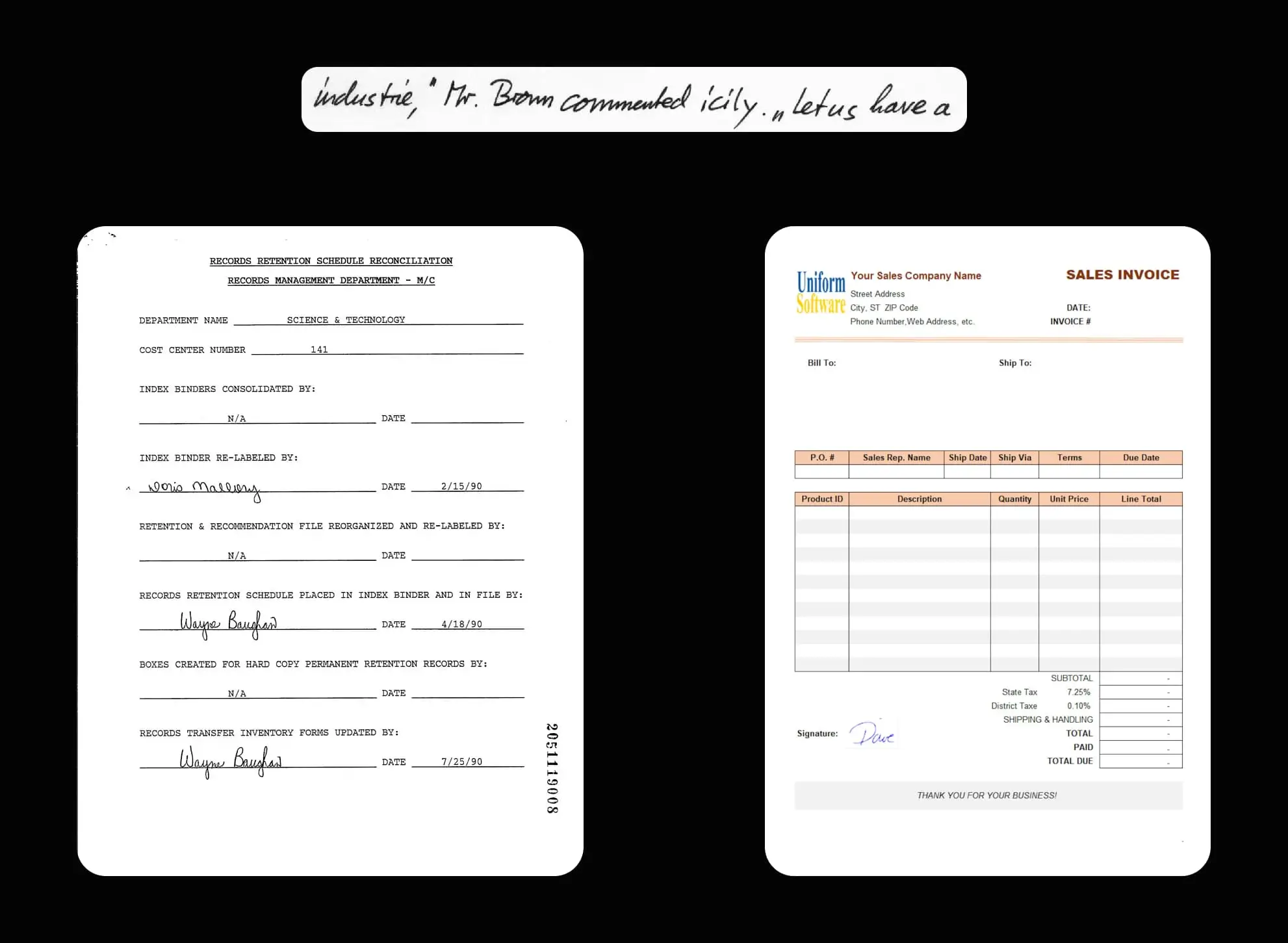
Every tool received the same three documents, with no fine tuning and no prompt tailored to one vendor. The three are a deliberate escalation.
Test 1, a single handwritten line taken from IAM. Pure transcription, no layout, nothing to interpret.
Test 2, a handwritten form taken from FUNSD, 199 noisy scanned forms with 31,485 annotated words and 9,707 semantic entities, published for form understanding rather than transcription.8 Printed labels and handwritten values sit side by side, which is where the real work starts.
Test 3, a standard US invoice carrying a handwritten signature. A business document where the handwriting is one small zone on a printed page, and the expected output is a name, not a shape.
Test documents
Pen to Print
Published by Serendi as a web app, mobile and desktop apps and a REST API, it is the only tool here built for handwriting and nothing else. From $9.99 a month for 100 pages, API access from $29.99 for 1,000 pages, ten free pages to try. The vendor advertises 98.7% word accuracy.9
Test on a single handwritten line
On the single handwritten line, Pen to Print performs correctly. No visible error appears in the transcription.

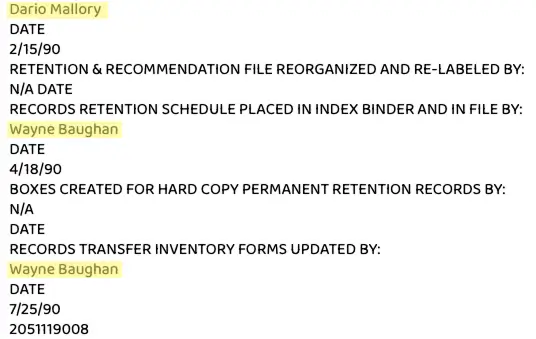
Test on a handwritten form
The text was correctly recognised and extracted, but each detected block comes back as a separate line. Pen to Print does not distinguish printed from handwritten text in its rendering: the output stays raw, structured only by line breaks.
Test on a handwritten invoice signature
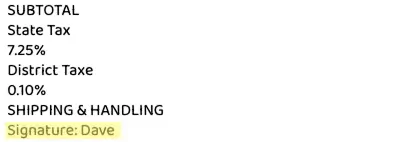
As in test 2, the handwritten data was correctly extracted. You simply have to find the line reading “Signature: dave” at the bottom of the output.
Result of the 3 tests
Pen to Print passes all three. An effective transcriber, including on documents mixing handwritten and printed content. The limitation is the output format, barely structured: retrieving one specific value is manual work. A good fit for digitising notes, a poor one for feeding a system.
TrOCR
A Microsoft Research model with open weights, published in 2021 and still the open source baseline for handwriting. An encoder decoder, BEiT image encoder feeding a RoBERTa text decoder, three sizes from 62M to 558M parameters. The large variant reports a CER of 2.89 on IAM.10 One line of the model card explains everything below: it is intended for single text-line images.
Test on a single handwritten line
For the handwritten sentence, TrOCR extracted the text perfectly, down to the smallest detail. Test 1 is a success, which is exactly what its published CER promises.

Test on a handwritten form
The output speaks for itself. TrOCR did not read the document, or rather did not understand its structure, and returned “ITV”, most likely a fragment of the text. The model has no layout analysis, so a structured page with handwritten fields is outside what it can do.

Test on a handwritten invoice signature
Instead of a name, the model produced non alphabetic characters, which suggests the signature was treated as a visual shape rather than readable handwriting.

Result of the 3 tests
TrOCR falls on two of the three. Without a contextual layer, it has no way to handle them. On pure line recognition it is excellent and free. On stylised handwriting such as signatures, and on structured business documents, it stops. A solid choice for raw transcription at volume, a bad one for anything else. The same caveat applies to most open source OCR engines.
OpenAI
These are not OCR products, they are general purpose models that happen to read documents well. Images are billed as tokens: the picture is cut into 32 by 32 pixel patches, the count multiplied by a model coefficient and added to the prompt.11 The vision documentation lists no handwriting specific limitation, and in the 2025 benchmark above GPT-4o reached a CER of 1.75 on IAM lines with no fine tuning.
Test on a single handwritten line
All the text came back, with a small formatting error: the quotation marks present in the sentence were detected correctly, and extra ones added where there were none. The handwriting recognition worked, the punctuation did not.

Test on a handwritten form
On the handwritten fields inside the form, OpenAI performed well. The text was extracted without error.
Test on a handwritten invoice signature
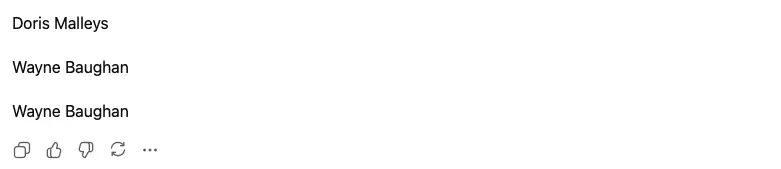
As expected, the handwritten signature was correctly detected and transcribed. No error at this stage.

Result of the 3 tests
One error, and an instructive one. The hallucinated quotation marks did not prevent extraction, but they illustrate the failure mode of a general model: it does not fail by returning nothing, it fails by returning something plausible. That is harder to catch than a blank field.
Gemini
Google arrives twice here. Gemini accepts PDFs up to 50MB or 1,000 pages, bills a page at 258 tokens and has a free tier on its Flash models.12 Google Cloud Document AI separately sells Enterprise Document OCR, handwriting in more than 200 languages at $1.50 per 1,000 pages, with handwriting flagged per token.13 In the 2026 handwritten forms benchmark, a Gemini model was the top performer at about 85% field accuracy.
Test on a single handwritten line
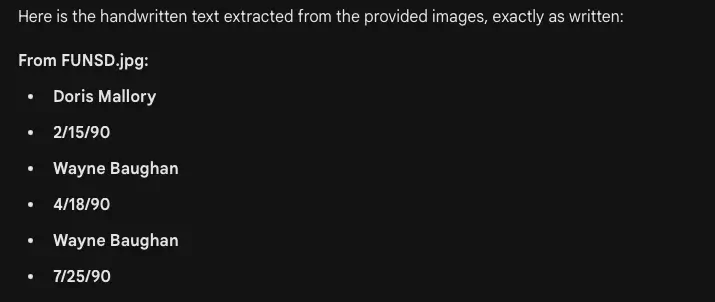
The handwritten text was fully extracted with all the correct information, including the quotation marks that tripped up the previous tool.

Test on a handwritten form
Perfectly executed. All handwritten fields were extracted correctly.
Test on a handwritten invoice signature
Also successful. Gemini detected and extracted the handwritten signature name.

Result of the 3 tests
Three tests, no error. The comprehension layer makes the difference on the form and on the signature, where reading the pixels is not enough and you have to understand what the zone is for. As a technology component it is excellent. What it does not give you is a confidence score per field, a place to define which fields you want, or any way to know the answer it just produced is wrong.

Mindee
A document processing API sold by the credit: one processed page costs one credit, 1.5 with a confidence score returned.14 Handwritten text recognition arrived on receipts in 2023. Unlike the previous three it is not something you point at a document: you first define an extraction model with a data schema, which is what we did for each test.
Test on a single handwritten line
On the handwritten line, Mindee correctly extracted the data. No error identified.

Test on a handwritten form
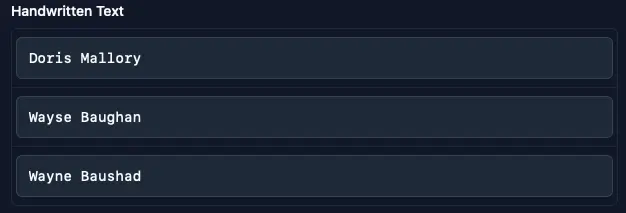
On more complex documents Mindee recognises and extracts handwritten text inside a defined extraction field, which is both its strength and its constraint.
Test on a handwritten invoice signature
The handwritten signature was correctly extracted into the field created for it.

Result of the 3 tests
Three passes, with one condition. For all three tests we had to build a model dedicated to handwritten text. Once configured, Mindee identified the right zones and returned the information. A solid option, provided you know in advance which fields you want and accept a template per document type. Full feature comparison here.
Koncile
Koncile is an AI document extraction platform rather than an OCR engine: classification, extraction, business rule validation and document fraud detection in one pipeline. Fields are described in plain language, no model to train, and handwritten text extraction is a field type of its own alongside the printed ones.
Test on a single handwritten line
On the standalone handwritten line the text was extracted with all its subtleties and without error.

Test on a handwritten form
Everything was correctly extracted here as well. Beyond the handwritten names, the associated dates came back automatically, each attached to the right field rather than returned as a loose line.

Test on a handwritten invoice signature
The signature name was extracted inside the dedicated handwritten text field, next to the printed data of the invoice.

Overall score of the 3 tests
Three tests, no error, and additional information surfaced in tests 2 and 3. Extraction fields are generated from what is actually detected in the document, with dedicated fields for handwritten text and structured fields for the rest. That separation is what makes the output usable downstream: a value read from handwriting is labelled as such, so it can be routed to a human check while the printed fields flow straight through.
Results side by side
| Tool | Line | Form | Signature | Errors | What you get back |
|---|---|---|---|---|---|
| Pen to Print | Pass | Pass | Pass | 0 | Flat text, line by line |
| TrOCR | Pass | Fail | Fail | 2 | Raw text, one line at a time |
| OpenAI | Punctuation | Pass | Pass | 1 | Free text, format varies |
| Gemini | Pass | Pass | Pass | 0 | Free text or JSON on request |
| Mindee | Pass | Pass | Pass | 0 | Fields, template built first |
| Koncile | Pass | Pass | Pass | 0 | Fields, handwriting typed apart |
Read the last column first. Four tools out of six passed every test and none is interchangeable, because passing means something different each time. Pen to Print returns characters. TrOCR returns the characters of one line. OpenAI and Gemini return text whose shape depends on how you asked. Mindee and Koncile return fields, the only output a business system consumes without someone rewriting it.
What the table hides is the document that is not in it. Every tool here got three clean, legible samples. The published research says the ranking holds on clean lines and collapses on real forms, which is why the choice below is about the pipeline, not the reading.
What breaks after the transcription
In production the handwriting is rarely the hard part. What it means is.
Take a hospital prescription arriving at a home care provider. Several treatments are printed on the page and only one is actually prescribed, marked by a ticked box. A transcriber returns all of them. HealthNet Homecare runs more than a million pages a year this way, and what decided their choice was not transcription quality: it was returning only the checked lines, matching the treatment against their own medication reference and comparing the result with what their teams typed in. Roughly one file in forty shows a discrepancy between document and manual entry, now caught before preparation rather than after. A handwritten dosage is precisely the case their confidence score routes to a human. The full story is in the HealthNet Homecare case study.
Same document, other setting: at a medical laboratory the receptionist reads the prescription, identifies each test and maps it to the lab's internal nomenclature code. Paired with a scanner button at EPSON, the prescription goes from the tray to the patient file with the tests already coded. Handwriting recognition is one step of four, and the other three are where the time was going.
Three things separate a transcriber from a pipeline, and none is about reading. Knowing what document it is before extracting, so a form and an invoice are not treated alike. Attaching each value to a named field rather than a line number. And flagging uncertainty per value, so a review queue exists at all. Without that third one, 85% field accuracy means 15% of your records are silently wrong.
Which OCR should you choose?
The answer depends on what happens to the text after it is read.
You need a transcript. Notebooks, archives, meeting notes. Pen to Print does this well for a few dollars a month, TrOCR for free if you can run a model and your documents are single lines. Neither structures anything.
You need to read a handful of documents occasionally. OpenAI and Gemini are the fastest path, no setup, no commitment. Watch the failure mode: they answer even when they should not, and give you nothing to measure that against.
You need handwritten data inside a business process, in volume, feeding an ERP, a patient record or a HR system. This is where Mindee and Koncile belong and where the others stop being candidates. Mindee expects you to model each document type up front. Koncile generates the extraction fields from the document, types handwritten text apart from printed, scores every value and applies business rules on top, which is what turns 85% of fields read into a process you can run.
One rule holds whatever you pick: test on your own documents, not a clean sample. The gap between a benchmark line and your worst scan is bigger than the gap between any two tools here.
Frequently asked questions
Does OCR work on handwriting?
Yes, and much better than two years ago. On clean handwritten lines, general purpose AI models reach a character error rate around 1.75%, which beats models trained specifically for handwriting. Accuracy drops sharply on real documents: on handwritten forms, the best models of 2026 read about 85% of fields correctly. Classic engines such as Tesseract are not designed for handwriting and should not be used for it.
What is the best OCR for handwriting recognition?
There is no single answer, because the tools do different jobs. For pure transcription, Pen to Print and TrOCR are effective. For reading a few documents occasionally, OpenAI and Gemini are accurate and need no setup. For structured extraction feeding a business system, Koncile and Mindee are the two options here, and Koncile is the one that does not require building a template for each document type in advance.
Can OCR read cursive writing and signatures?
Cursive is handled well by models with a contextual layer, which infer ambiguous letters from surrounding words. Signatures are a different problem, closer to a drawing than to text. In our test the open source model returned non alphabetic characters for a signature, while the models with a comprehension layer returned the name. If you need the name behind a signature, test that case specifically.
Is free handwriting OCR good enough?
For transcription, often yes. TrOCR is free and open source, and Pen to Print offers ten free pages. The limit is structure rather than reading: free tools return flat text, so extracting one specific value stays manual. Cloud handwriting OCR starts around $1.50 per 1,000 pages, and extraction platforms are priced per page or per credit.
How accurate is handwriting OCR on medical or business forms?
Expect materially less than the headline benchmark numbers. A 2026 study of seventeen models on real handwritten medical forms measured about 85% of fields read correctly for the best performers, with hallucinated content in some cases. That is why a confidence score per field, and a review path for the uncertain ones, matters more than the last decimal of accuracy.
Which languages are supported for handwriting?
Far fewer than for printed text. AWS Textract handles handwriting in English only, against six languages printed. Azure AI Document Intelligence supports twelve handwritten languages against around three hundred printed. Google Cloud Document AI claims handwriting across more than 200 languages. Platforms built on multimodal models are less constrained, but the claim is worth testing on your own alphabet.
Sources
- Tesseract documentation, FAQ, “Can I use Tesseract for handwriting recognition?”, tesseract-ocr.github.io
- Amazon Web Services, Amazon Textract FAQs, language and handwriting support, aws.amazon.com
- Microsoft Learn, Azure AI Document Intelligence, OCR language support, Read model v4.0, learn.microsoft.com
- FKI, IAM Handwriting Database, version 3.0, Marti and Bunke, University of Bern, fki.tic.heia-fr.ch
- Crosilla, Klic and Colavizza, “Benchmarking Large Language Models for Handwritten Text Recognition”, arXiv 2503.15195, 2025, also in Journal of Documentation vol. 81 no. 7. Eight multimodal models against Transkribus, zero shot, on English, French, German and Italian datasets, arxiv.org/abs/2503.15195
- Pather et al., “From Handwriting to Structured Data: Benchmarking AI Digitisation of Handwritten Forms”, arXiv 2604.16504, April 2026. Seventeen models on 49 real handwritten medical registry forms, arxiv.org/abs/2604.16504
- OmniDocBench, arXiv 2412.07626, text edit distance by page type, arxiv.org/abs/2412.07626
- Jaume, Ekenel and Thiran, “FUNSD: A Dataset for Form Understanding in Noisy Scanned Documents”, ICDAR-OST 2019, arxiv.org/abs/1905.13538
- Pen to Print, pricing page, September 2026. Accuracy figure self reported, pen-to-print.com
- Li et al., “TrOCR: Transformer-based Optical Character Recognition with Pre-trained Models”, arXiv 2109.10282, table 4, arxiv.org/abs/2109.10282
- OpenAI, images and vision guide, image token billing, developers.openai.com
- Google, Gemini API document processing documentation, ai.google.dev
- Google Cloud, Document AI pricing and language support, September 2026, cloud.google.com
- Mindee, pricing page, credit model, September 2026, mindee.com
Benchmark run in September 2026 on the three documents described above. Published figures were verified on their primary sources in September 2026; vendor pricing changes often and should be checked before relying on it.
<script type="application/ld+json">
</script>