Extracting and structuring document data, enriching it, detecting fraud… With AI, building your own end-to-end document processing or fraud detection solution has never looked so simple. That said, buying an off-the-shelf solution often turns out to be the better option. Buying is what guarantees that your solution runs on state-of-the-art technology, handles every error and technical difficulty you will inevitably run into, handles the infrastructure for scaling up, the regulatory and security side…
After many discussions with prospects and customers facing this very question (build or buy), we have put together the complete list of the thirty-nine difficulties you should expect to overcome if you decide to build. Even in the age of AI, where building is easier than ever, building remains more expensive and more difficult than it looks: maintenance, error handling, infrastructure, security… AI is certainly full of promise, and also full of illusions. What follows should help you tell the two apart.
Building has become fast
Before 2025, building an in-house document processing solution took a dedicated team several months. Today, Claude Code or another coding agent lets you build a prototype in a few days: receiving and sorting documents, reading PDFs and images, extracting fields through a language model call, checking the consistency of the data and metadata, verifying the document's authenticity, exposing an API to pass results to the ERP or line-of-business tool in its format, with a way to retry on failure. On 100 test documents the result is good, and a decision maker can legitimately feel that this is the answer: build it in-house.
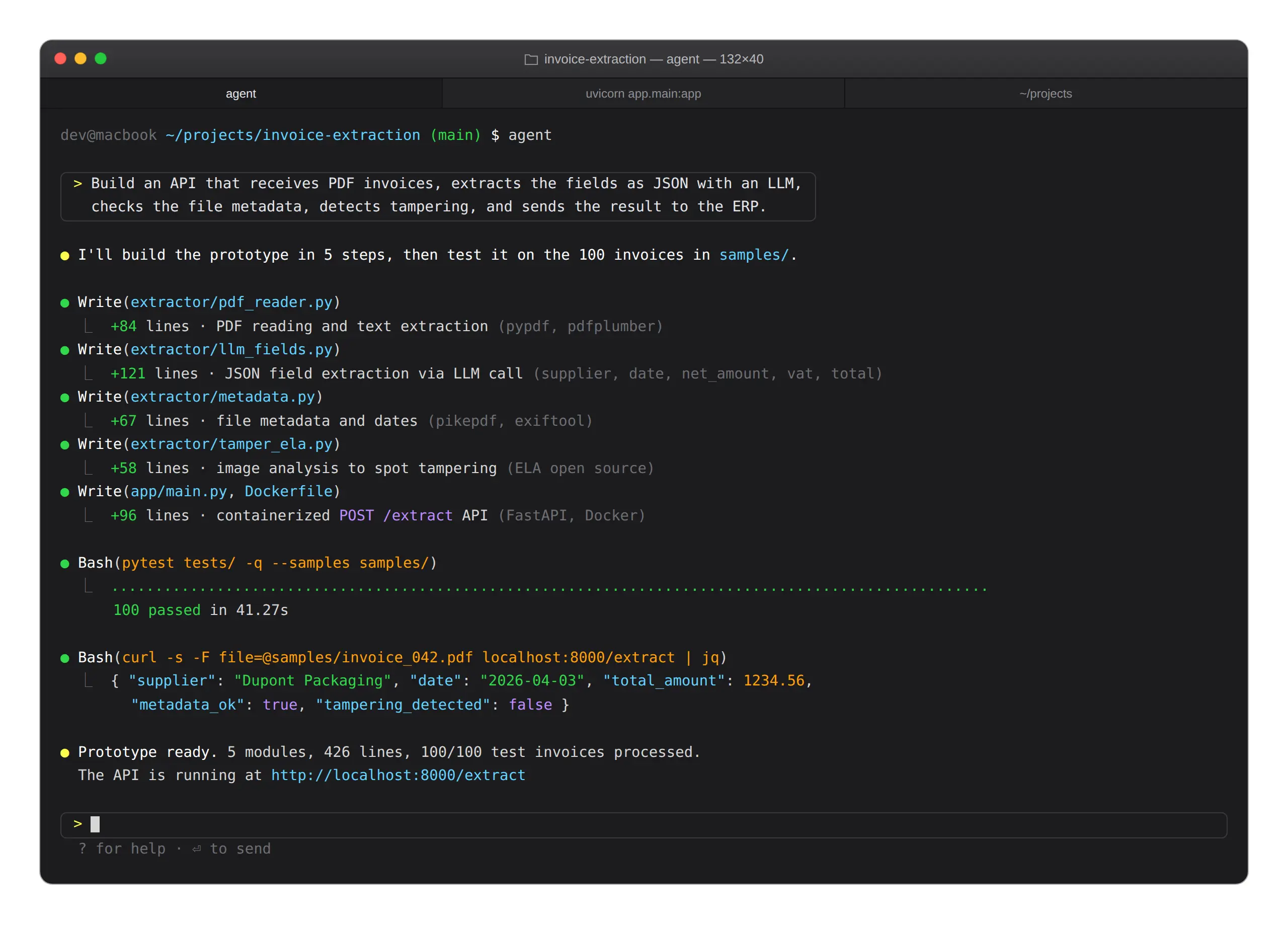
Typically, a coding agent will produce something more or less along these lines:
The stack makes sense and the code it produces is clean, so tools of this kind have made that prototyping reachable for small teams, and even for barely technical ones. That is what makes it exciting and motivating. That is what creates the feeling of being able to build everything in-house. And that is also what can become a new risk in the decision.
Thirty-nine difficulties that show up in production
Following many exchanges with teams tempted by building, we have put together a list of thirty-nine challenges and topics that come back regularly and that you should expect to face if you go the build route. No single challenge is insurmountable in itself, but together they add up to an unexpected load that is better anticipated than discovered as production bugs a few weeks in. We have lost count of the times a prospect came back to us a few months after attempting to build, and ended up buying. Precious time lost to the illusion of ease that AI can create, and to how hard it is to anticipate in detail the challenges ahead.
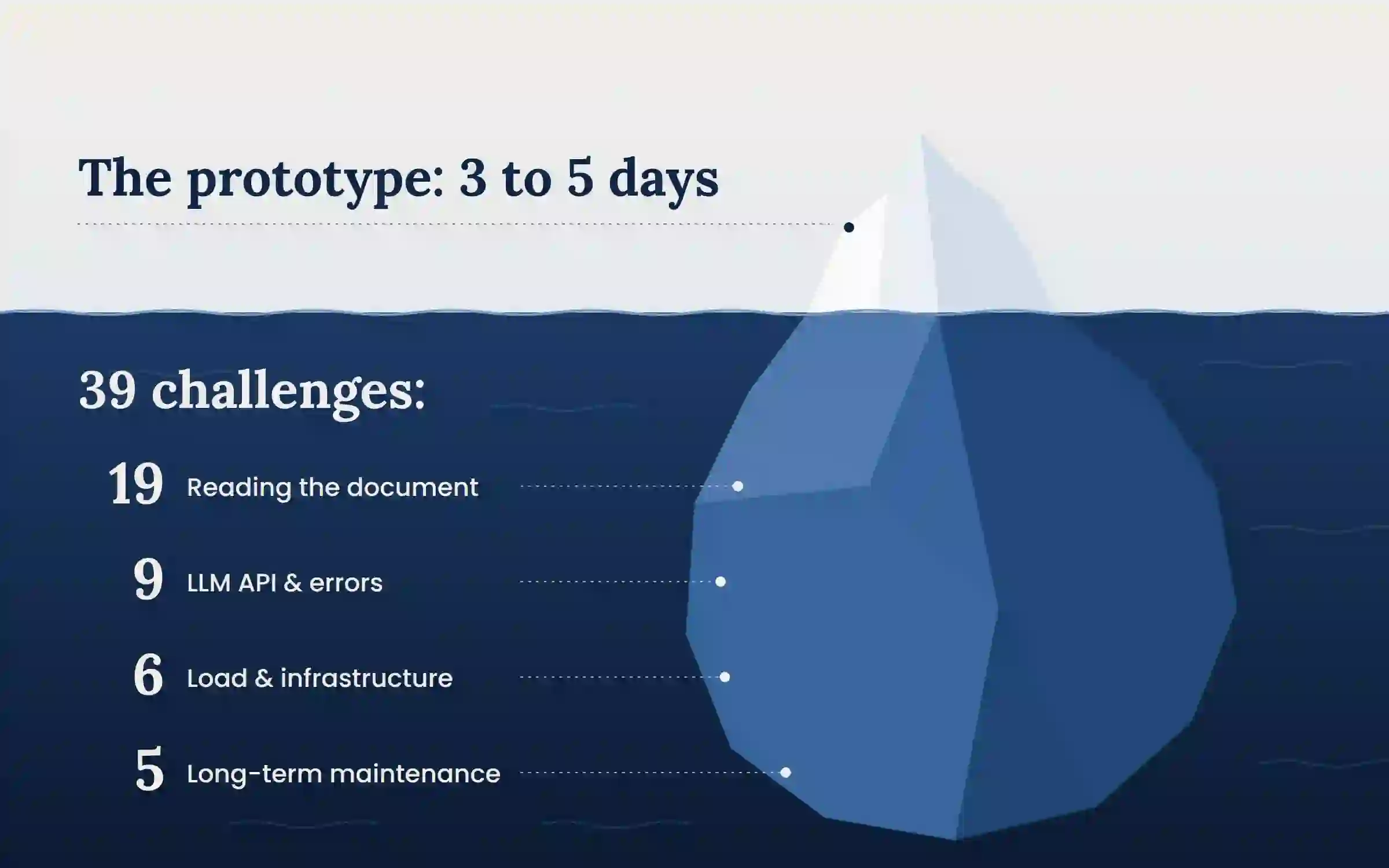
Splitting a bundle of documents and reading handwriting are subjects in their own right. Each of the other points is a challenge you will only take on once you meet the error, in production.
Taken in isolation, each of these challenges can be resolved in a few hours. Taken together, they interact and turn a project meant to be quick and efficient into a sprawling machine that is expensive to build, maintain and secure. Worth knowing before starting.
The maintenance never stops
A document processing tool has to be maintained. Models change every few months, issuers change their formats without notice, security requirements evolve, customer expectations shift. An in-house project therefore commits a permanent load that goes well beyond the initial build.
That load is the least visible at the moment of decision, and the most painful. Especially when it is discovered after the fact. It covers several distinct pieces:
- Following available models, evaluating them on your own documents, and trading off quality, cost and latency.
- Maintaining an annotated reference set, without which no improvement can be measured.
- Absorbing issuer format changes, which come without warning.
- Holding security and compliance, often now a condition for signing a customer.
- Staying available for incidents, including during holidays and busy periods.
This work has no end. It durably occupies part of a team, on a subject that is almost never the organisation's own business.
Verifying that the document is genuine
Forged documents are more and more frequent, and fraudsters more and more clever. How do you make sure that a loan application or an insurance claim file is genuine? In this area, building becomes close to impossible: image and pixel analysis, metadata study and hundreds of highly specific business rules, comparison against internal databases of reference documents, fine-grained consistency analysis of the document, comparison against data pulled from external databases.
A language model understands perfectly well that it is looking at a payslip and returns the net pay. It does not measure compression differences between two areas of an image, it does not compare the tool declared in the metadata against what a given issuer usually produces, and it does not spot an object layer added to the file after issuance. And all of this has to be done business by business, document type by document type, use case by use case. Good luck.
What language models critically lack is the basis for comparison and the fine-grained domain knowledge: knowing what a given issuer normally produces requires having observed a large number of their genuine documents. The hidden signals of document fraud and the three detection methods cover that mechanism in detail.
When building is still the right decision
So when should you build? Building still makes sense in several situations. Here are the four questions to ask in order to decide:
- Where do the documents come from? Produced in-house, the format is controlled and the problem stays manageable. Received from third parties, heterogeneity and security become the critical subjects.
- What has to be done with them after reading? If the point is to feed an internal dashboard, the risk stays low. But if a payment has to be triggered, a contract granted or a file rejected, then even with good reliability there is a considerable inherent risk that is hard to control with a home-made solution.
- How often do formats change? A stable format is handled by a one-off development. A format that moves every quarter means non-developers have to be able to keep up.
- Is document processing part of the business? If it is the product being sold, it gets built. Otherwise it competes with the rest of the engineering roadmap.
The shortest route to a view is testing on your own documents, picking the hardest ones rather than the most legible.
When is building still the right decision?
When the document is produced in-house, highly structured and stable, a dedicated development gives better results than a general engine. When volume is low and predictable, on a single format, and the data does not trigger a committing decision. And when document processing is part of the product the organisation sells.
Sources
- Expert observations from running a document processing and fraud detection platform: Koncile.